Apps made by a teacher

Your own app, without the app-store faff.

Brooker Builds makes simple, friendly web apps for schools, scout groups, youth shows, clubs and events. People open a link, tap “Add to Home Screen”, and it works like any other app on their phone.

  • Works on any phone or laptop
  • No logins unless you want them
  • Built-in feedback box
  • Free working mock-up
What I make

Apps for the people you look after

Every app is made for your group, in your colours, with just the features you need.

🏫

School apps

Student hubs, revision apps and homework planners that pupils actually open.

  • Key dates, links and daily timings in one place
  • Revision quizzes matched to the spec
  • Homework and revision timetables
⚜️

Scout & youth group apps

Keep parents and leaders up to date without another WhatsApp group.

  • Newsletters and updates
  • Countdowns to camps and shows
  • Family-code access
🎪

Event & activity day apps

Turn a day out into a game, with digital passports that children fill as they go.

  • Scan a QR code to collect a stamp
  • Progress bars and badges
  • Info for each activity
🧰

Tools for teachers & staff

Small tools that save hours of admin and copy-and-paste.

  • Visual timetables made from timetable exports
  • Marking and feedback helpers
  • Self-marking spreadsheets
🎨

Hobby & family apps

Fun personal projects, like a collection tracker or a family app.

  • Catalogues and collections
  • Personalised for whoever uses it
  • Safe for children to use
🔧

Updates & care

Apps need looking after. I can keep yours up to date through the year.

  • Content updates and new features
  • Simple usage stats
  • Suggestions box and problem reports
Why Brooker Builds

Built by someone who knows what a school day is like

I'm a secondary school teacher and a scout leader. I make apps for the same kinds of people I work with every week.

Simple for everyone

Large buttons, clear words and no clutter, so a Year 7 pupil or a busy parent can use it straight away.

Safe by design

No names unless you need them, no adverts and no tracking cookies. Children's data is kept out wherever possible.

No app store needed

Apps open from a link or a QR code and install to the home screen. Updates arrive automatically.

Low running costs

Most apps run on free, reliable hosting, so there are no big monthly bills.

Examples

Real apps, already in use

These are real screens from apps I've built and look after. Every one started with a conversation about a real problem.

Secondary school

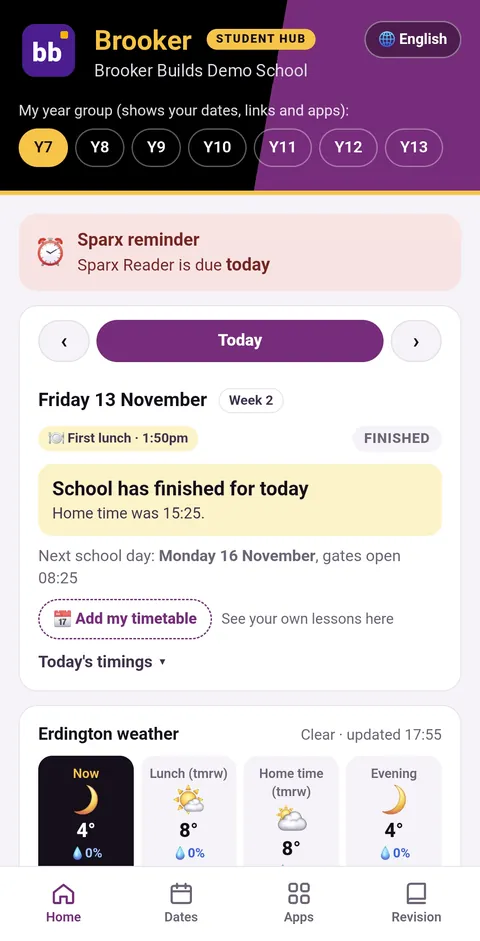
Student Hub

One app for everything a pupil needs each day. It’s set to their year group, so they only see what matters to them.

Top features

  • A “Today” panel with school times and the next school day
  • Countdowns to open evenings, mocks and key dates
  • Homework reminders on the days work is due
  • Live local weather for lunch and home time
  • Links to every other school app in one place
  • Built-in suggestions box and usage stats
Maths, Years 7–11

Maths Help

Pupils pick their year, topic and the skill they’re stuck on, learn it step by step, then practise it.

Top features

  • Worked examples broken into clear steps
  • Practice questions marked instantly
  • Mastery stars for 3 right first time
  • Progress tracked by year and topic
  • Foundation and Higher tiers
  • Search for any skill, e.g. “Pythagoras”
GCSE-level BTEC

Exam Revision App

Exam revision for BTEC Digital IT, with a friendly mascot giving exam tips along the way.

Top features

  • Learn, Quiz, Flashcards, Exam Qs and Exam skills
  • 134 searchable key terms, each tagged to the spec
  • Mascot tips on exam technique
  • Links to trusted revision notes and videos
  • Exam facts at a glance: marks and timings
Years 7–11

Homework & Revision Planner

Pupils tick their subjects, say how confident they feel and get a revision timetable built for them.

Top features

  • Set up in 4 easy steps
  • Rate how confident you feel in each subject
  • A weekly revision timetable made for you
  • Homework due in the next few days
  • Focus timer that chimes at break time
Scouting youth show

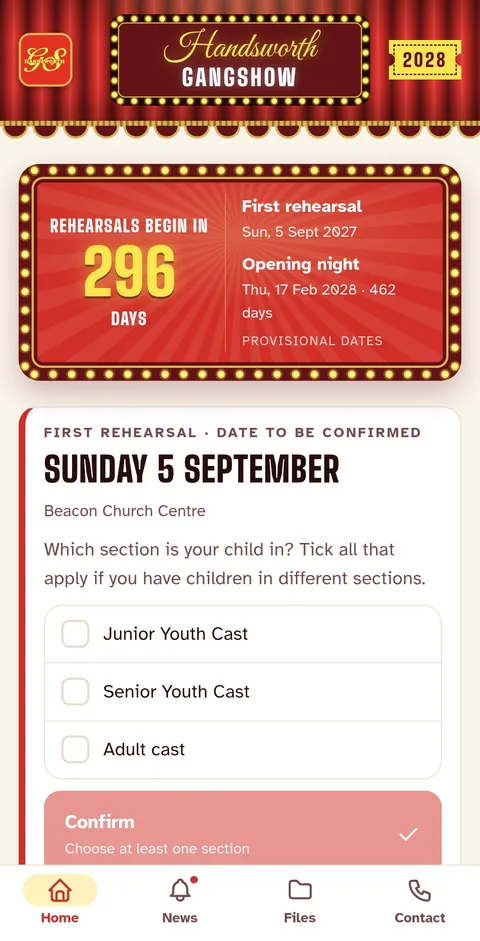
Handsworth Gangshow

The family app for a scouting show: rehearsal news, files and countdowns, in the show’s own red and gold.

Top features

  • Countdowns to rehearsals and opening night
  • Families choose their child’s section
  • News, files and contacts in one place
  • Members-only photo gallery: show photos stay blurred and locked
  • Venue photos watermarked “members only, do not share”
  • GS the Bear’s postcards to keep children excited
Multi-faith activity day

Faiths for Fun Passport

Children aged 7–12 collect a stamp at each of 7 faith bases, turning the day into a challenge.

Top features

  • A personal passport card for each child
  • 7 stamps with a progress bar
  • Info about what happens at each base
  • A timetable for the day
  • Works on any phone, no download needed
Family & hobby

My Card Collection

Children scan their trading cards to build a collection, see what each card is worth and spot swaps.

Top features

  • Snap a photo to read the card’s name and number
  • English, European and Asian cards
  • Estimated values for every card
  • Duplicate finder for swapping
  • A wishlist for cards they want
  • No login, no adverts, automatic backups

School screens are shown with Brooker Builds demo branding. Tap any screen to see it larger.

These are just examples, not the limit

Every app on this page was made for one group with one problem to solve. Yours can be completely different: a sports club, a church, a youth group, a small business, a school department or an event. If you can describe what people should be able to do, it can almost certainly be built.

FREE

Get a working mock-up of your app, free

Before you pay anything, I'll build a working mock-up of your app with its main features, so you and your team can try it on your own phones.

  • No payment and no obligation
  • Core features working, so you can really test the idea
  • Marked “DEMO · © Brooker Builds” across the screen
  • Then a clear, fixed quote for the full app
Ask for your free mock-up →
Try it yourself

A real app on your home screen, with no app store

This demo phone works. Tap the Riverside Scouts icon to open a made-up group app, then try collecting stamps and answering the quiz.

  • Your own icon and name on people's home screens, next to their other apps
  • Opens full-screen, with no browser bars, just like a downloaded app
  • One link or QR code to share. People tap “Add to Home Screen” and it's installed
  • Updates appear automatically, with nothing to re-download
  • Works on iPhone and Android
9:41▮▮▮ ◔
Friday
13
📷Camera
🖼️Photos
📅Calendar
📝Notes
⛅Weather
⏰Clock
🎵Music
👆 Tap to open
📞💬🧭✉️
⚜️Riverside Scouts
⚜️ Riverside ScoutsDemo app · made-up group
SUMMER CAMP STARTS IN
–
Fri 24 July · Forest Campsite
📰 Kit list is here

Everything your child needs for camp, with a tick list.

📅 This week

Tuesday 7pm: pioneering night. Bring old clothes!

✅ Permission forms

18 of 24 returned. Thank you!

Swipe bar or to go back to the home screen

How it works

From idea to app in five steps

Have a chat

Tell me who it's for and what problem it needs to solve. There's no cost and no obligation.

Try a free mock-up

You get a working mock-up of your app, free and with no obligation, to test on your own phones. Then I give you a fixed quote.

Build & test

I build the app in your colours, and a few of your people test it first.

Launch

You get a link and a QR code to share. People add it to their home screen.

Keep improving

Users send ideas through the built-in suggestions box, and I keep the app up to date.

FAQs

Good questions

Do people need to download it from an app store?

No. Your app opens from a link or QR code in any phone browser, and people can add it to their home screen so it opens like a normal app. That means no app store fees or approval waits, and updates arrive automatically.

Do I have to pay for the mock-up?

No. The working mock-up is completely free and there's no obligation. It has your app's main features working, so your team can try it properly. It's marked “DEMO · © Brooker Builds” across the screen. If you like it, I'll give you a fixed quote for the full app. If not, you've lost nothing.

Can you build something that isn't like your examples?

Yes. The examples show the kind of thing I make, not the limit. Tell me what you need people to be able to do and I'll tell you honestly whether it can be done.

How much does it cost?

It depends on what the app needs to do. Your mock-up is free. After you've tried it, I'll give you a clear, fixed quote for the full app. I'm happy to talk to schools, charities and volunteer groups about their budgets.

How long does it take?

A simple information app can be ready in a couple of weeks. Apps with quizzes, passports or scanning take longer. Tell me your deadline, such as an event date or the start of term, and I'll plan around it.

What about children's data and safety?

Apps are designed to collect as little personal data as possible, and none at all where that works. They have no adverts and no tracking cookies. Group apps can be locked behind a family or member code.

Can you update the app after it launches?

Yes. Most groups need new dates, newsletters or features through the year. Updates can be agreed one at a time or as part of an ongoing arrangement.

Do I need to be technical?

Not at all. If you can describe what you want people to be able to do, I'll handle the rest, including hosting.

Enquiries

Got an idea for an app?

Tell me a little about it and I'll get back to you, usually within a couple of days. Rough ideas are welcome. Your first working mock-up is free, with no payment and no obligation.

Prefer email? Write to brookerbuilds@gmail.com